What a HIPAA Risk Analysis Has to Cover
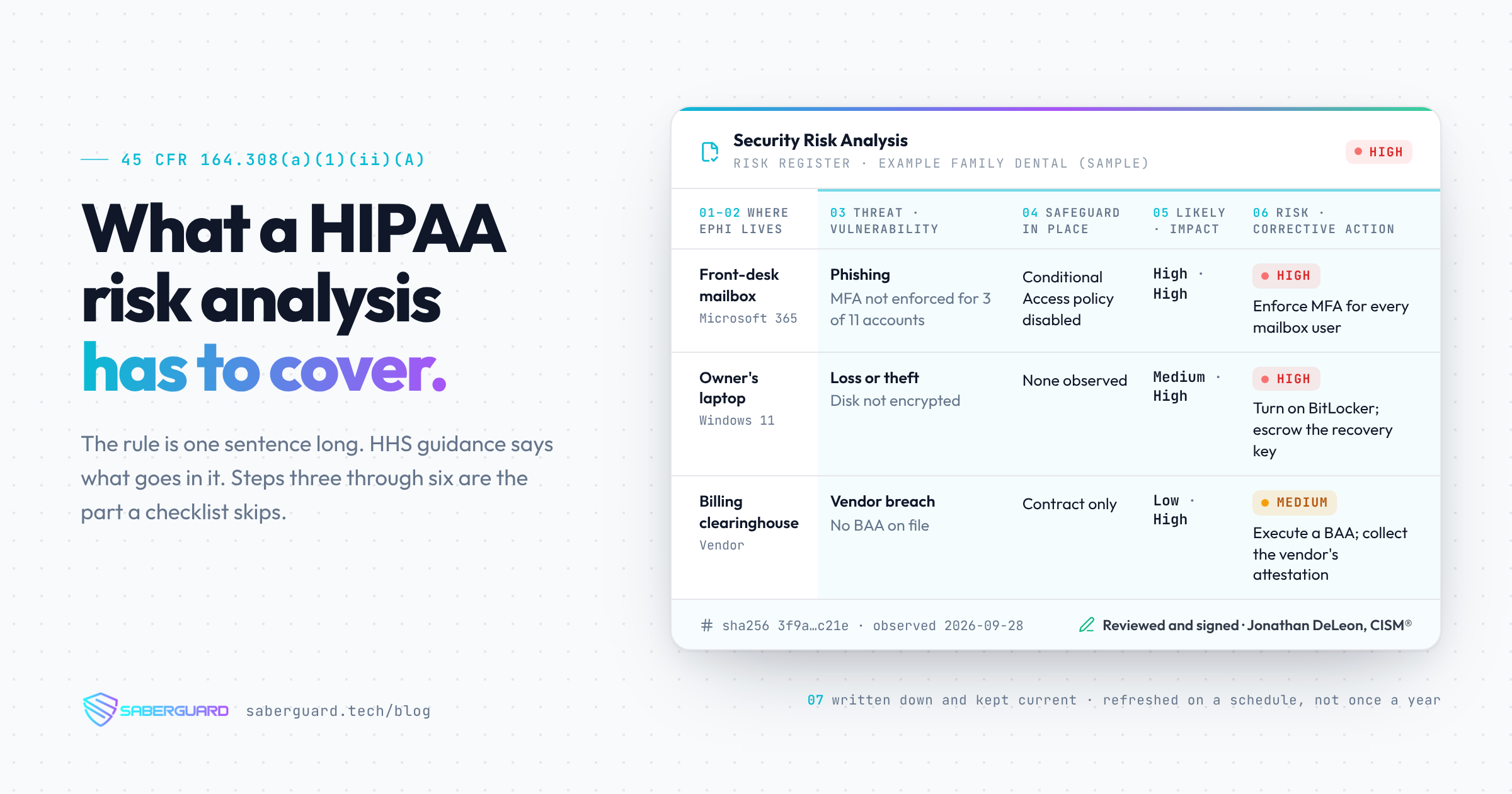
The HIPAA risk analysis requirement is one sentence long, and it does not say how. HHS guidance fills that in. Here are the seven things a risk analysis has to cover, in plain English, and the part most checklists skip.

The HIPAA Security Rule's risk analysis requirement is one sentence long. Here it is, from 45 CFR 164.308(a)(1)(ii)(A):
Conduct an accurate and thorough assessment of the potential risks and vulnerabilities to the confidentiality, integrity, and availability of electronic protected health information held by the covered entity or business associate.
That is the whole requirement. It tells you to do a risk analysis. It tells you the analysis has to be accurate and thorough. It does not tell you how.
Where the "how" comes from
In 2010, the HHS Office for Civil Rights (OCR) published its Guidance on Risk Analysis Requirements under the HIPAA Security Rule. It walks through the elements OCR expects a risk analysis to contain, and it draws on the NIST risk assessment method (NIST SP 800-30) that most security practitioners already use.
One caution before the list. The guidance is HHS explaining the rule. It is not the rule itself. A practice is held to the regulation, not to the guidance document. But when OCR asks for your risk analysis, this document is the clearest public statement of what they expect to see. Treat it that way.
Here is what it asks for, in plain English.
The seven things a risk analysis has to cover
1. Every place ePHI lives, on any electronic medium
Scope comes first. The analysis has to cover all electronic protected health information your practice creates, receives, maintains, or transmits, no matter where it sits. The EHR, yes. Also the mailbox the front desk uses to send referrals, the practice management system, the billing clearinghouse, the shared drive with scanned intake forms, the phones with the patient portal app on them, the backup drive in the closet, the fax-to-email service, and the laptop the owner takes home.
If ePHI can be on it, it is in scope. A risk analysis that only looks at the EHR is not thorough.
2. Where that data is stored, received, maintained, or transmitted
Once you know what is in scope, write down where the data actually goes. This is the inventory. Which systems hold ePHI. Which ones send it and receive it. Which vendors touch it. Which devices can reach it.
For a small practice this is usually a one- or two-page table, and it is the foundation for everything that follows. You cannot assess the risk to data you have not located.
3. The threats and the vulnerabilities
This is where a risk analysis becomes an analysis. For each place ePHI lives, identify what could go wrong and what weakness would let it.
A threat is something that could act on your data: a phishing email, a lost laptop, a former employee whose account was never disabled, ransomware, a burst pipe above the server closet, a vendor breach. A vulnerability is the gap that lets the threat succeed: no multifactor authentication on email, no encryption on the laptop, no offboarding step that removes access, no tested backup, no business associate agreement with the vendor.
Threats and vulnerabilities have to be documented together. "Phishing" by itself is not a finding. "Phishing, against mailboxes that have no MFA and no sign-in alerting" is.
4. The safeguards you already have
Before rating anything, take stock of what is already in place and whether it works. Which safeguards are configured. Which are written in a policy but not enforced. Which are turned on for some users and not others.
This is where good intentions get checked against reality. A practice may believe MFA is on for everyone. The tenant configuration often says otherwise. The analysis has to record what is actually true at the time of the assessment, not what the policy binder says.
5. Likelihood and impact
For each threat and vulnerability pair, rate two things. How likely is it, given the safeguards you have? And if it happens, how bad is it for the confidentiality, integrity, or availability of ePHI?
The scale can be simple. High, medium, and low is fine for a small practice, as long as you write down what each level means and apply it the same way every time. What matters is that the rating is reasoned and recorded, not that it uses a particular formula.
6. A level of risk, and the corrective actions
Likelihood and impact together give you a risk level. Rank the risks. Then, for each one, say what you are going to do about it, who owns it, and roughly when.
This list is the bridge to the risk management standard that sits right next to risk analysis in the rule, 45 CFR 164.308(a)(1)(ii)(B), which requires security measures sufficient to reduce risks to a reasonable and appropriate level. The analysis finds the risks. The corrective action list is the plan to manage them. A risk analysis with no corrective actions is a diagnosis with no treatment.
7. Written down, and kept current
The analysis has to be documented. The Security Rule's documentation standard, 45 CFR 164.316(b), requires a written record of required assessments, kept for six years, and reviewed and updated in response to changes in the environment.
"Kept current" is the part that trips up practices that treat the risk analysis as an annual event. A new EHR, a new location, a new cloud service, a new office manager with admin rights, a vendor change: each one changes the picture. The guidance does not set a calendar interval. It ties updates to changes in your environment. Many practices settle on an annual review as a baseline, and that is reasonable, as long as the document also changes when the practice does.
The part that gets skipped
Look at the seven items again. A checklist with yes and no boxes can handle item 1 and item 2, with some effort, and parts of item 4. It cannot do items 3 through 6. A checklist does not identify the threats specific to your practice, pair them with your vulnerabilities, weigh them against what you have in place, rate them, or tell you what to fix first.
That is the gap. A practice has a completed questionnaire, sometimes a thick one, and no analysis. The questionnaire answers "do you have a policy for this?" The regulation asks "what are the risks to your ePHI, how serious are they, and what are you doing about them?" Those are different questions, and only the second one is the risk analysis.
If your current document does not pair threats with vulnerabilities, rate them, and list corrective actions, it is a self-assessment. That is a useful starting point. It is not what 164.308(a)(1)(ii)(A) requires.
How SaberGuard does it
Our risk analysis covers all seven items, and every finding for items 3 through 6 is traced to evidence: the specific configuration that was observed, and when it was observed. Our assessment platform collects security configuration from the practice's Microsoft 365 or Google Workspace tenant on a schedule. It reads MFA state, admin roles, sharing settings, device compliance, and audit settings. It never reads email, files, calendars, or patient records. Because it runs on a schedule, item 7 is built in: a new admin account or a disabled MFA policy shows up as a finding, not as a surprise at next year's review. Jonathan DeLeon, CISM®, reviews every finding and signs the report.
If you want to see where your practice stands before you talk to anyone, start with the free HIPAA self-check. When you want the real thing, book a consult.
SaberGuard assesses and advises; it does not warrant compliance.
Need help with your security posture?
Let's talk about how SaberGuard can protect your business.
Get in Touch